
buluma.openssh
Ansible role openssh
Install and configure openssh on your system.
| GitHub | Version | Issues | Pull Requests | Downloads |
|---|---|---|---|---|
 |
 |
 |
 |
 |
Example Playbook
This example is taken from molecule/default/converge.yml and is tested on each push, pull request and release.
---
- name: Converge
  hosts: all
  become: true
  gather_facts: true

  roles:
    - role: buluma.openssh
      openssh_allow_users:
        - root
      openssh_allow_groups:
        - root
The machine needs to be prepared. In CI this is done using molecule/default/prepare.yml:
---
- name: Prepare
  hosts: all
  become: true
  gather_facts: false

  roles:
    - role: buluma.bootstrap
    - role: buluma.selinux
Also see a full explanation and example on how to use these roles.
Role Variables
The default values for the variables are set in defaults/main.yml:
---
# defaults file for openssh

# The tcp port ssh should listen on.
openssh_port: 22

openssh_address_family: any

openssh_listen_addresses:
  - "0.0.0.0"
  - "::"

openssh_host_keys:
  - /etc/ssh/ssh_host_rsa_key
  - /etc/ssh/ssh_host_ecdsa_key
  - /etc/ssh/ssh_host_ed25519_key

openssh_rekey_limit: default none

openssh_syslog_facility: AUTH

openssh_loglevel: INFO

openssh_login_grace_time: 2m
openssh_permit_root_login: "yes"
openssh_strict_modes: "yes"
openssh_max_auth_tries: 6
openssh_max_sessions: 10

openssh_pub_key_authentication: "yes"

openssh_authorized_key_file: ".ssh/authorized_keys"

openssh_authorized_prinicpals_file: none
openssh_authorized_keys_command: none
openssh_authorized_keys_command_user: nobody

openssh_host_based_authentication: "no"
openssh_ignore_user_known_hosts: "no"
openssh_ignore_rhosts: "yes"

openssh_permit_empty_passwords: "no"
openssh_password_authentication: "yes"

openssh_challenge_response_authentication: "no"

openssh_gssapi_authentication: "yes"
openssh_gssapi_cleanup_credentials: "no"
openssh_gssapi_strict_acceptor_check: "yes"
openssh_gssapi_key_exchange: "no"
openssh_gssaip_enable_k5_users: "no"

openssh_use_pam: "yes"

openssh_allow_agent_forwarding: "yes"
openssh_allow_tcp_forwarding: "yes"
openssh_gateway_ports: "no"
openssh_x11_forwarding: "yes"
openssh_x11_display_offset: 10
openssh_x11_use_localhost: "yes"
openssh_permit_tty: "yes"

openssh_print_motd: "no"

openssh_print_last_log: "yes"
openssh_tcp_keep_alive: "yes"
openssh_permit_user_environment: "no"
openssh_compression: delayed
openssh_client_alive_interval: 30
openssh_client_alive_count_max: 3
openssh_show_patch_level: "no"
openssh_use_dns: "no"
openssh_pid_file: /var/run/sshd.pid
openssh_max_startups: "10:30:100"
openssh_permit_tunnel: "no"
openssh_chroot_directory: none
openssh_version_addendum: none

openssh_banner: none

openssh_accept_envs:
  - LANG
  - LANGUAGE
  - LC_ADDRESS
  - LC_ALL
  - LC_COLLATE
  - LC_CTYPE
  - LC_IDENTIFICATION
  - LC_MEASUREMENT
  - LC_MESSAGES
  - LC_MONETARY
  - LC_NAME
  - LC_NUMERIC
  - LC_PAPER
  - LC_TELEPHONE
  - LC_TIME
  - XMODIFIERS

openssh_subsystem: sftp {{ openssh_sftp_server }}

# Specifies a file containing public keys of certificate authorities that are
# trusted to sign user certificates for authentication, or none to not use one.
openssh_trusted_user_ca_keys: none

# Restrict access to this (space separated list) of users or groups.
# For example: "openssh_allow_users: root my_user"
# openssh_allow_users:
#  - root

# For example: "openssh_allow_groups: wheel my_group"
# openssh_allow_groups: wheel

# The key exchange methods that are used to generate per-connection keys
# openssh_kexalgorithms:
#   - curve25519-sha256
#   - [email protected]
#   - ecdh-sha2-nistp256
#   - ecdh-sha2-nistp384
#   - ecdh-sha2-nistp521
#   - diffie-hellman-group-exchange-sha256
#   - diffie-hellman-group16-sha512
#   - diffie-hellman-group18-sha512
#   - diffie-hellman-group14-sha256

# The public key algorithms accepted for an SSH server to authenticate itself to an SSH client
# openssh_hostkey_algorithms:
#   - [email protected]
#   - [email protected]
#   - [email protected]
#   - [email protected]
#   - [email protected]
#   - [email protected]
#   - [email protected]
#   - [email protected]
#   - [email protected]
#   - ecdsa-sha2-nistp256
#   - ecdsa-sha2-nistp384
#   - ecdsa-sha2-nistp521
#   - [email protected]
#   - ssh-ed25519
#   - [email protected]
#   - rsa-sha2-512
#   - rsa-sha2-256
#   - ssh-rsa

# The ciphers to encrypt the connection
# openssh_ciphers:
#   - [email protected]
#   - aes128-ctr
#   - aes192-ctr
#   - aes256-ctr
#   - [email protected]
#   - [email protected]

# The message authentication codes used to detect traffic modification
# openssh_macs:
#   - [email protected]
#   - [email protected]
#   - [email protected]
#   - [email protected]
#   - [email protected]
#   - [email protected]
#   - [email protected]
#   - hmac-sha2-256
#   - hmac-sha2-512
#   - hmac-sha1
# openssh_allow_groups:
#  - wheel
Requirements
- pip packages listed in requirements.txt.
State of used roles
The following roles are used to prepare a system. You can prepare your system in another way.
| Requirement | GitHub | Version |
|---|---|---|
| buluma.bootstrap |  |
 |
| buluma.selinux |  |
 |
Context
This role is a part of many compatible roles. Have a look at the documentation of these roles for further information.
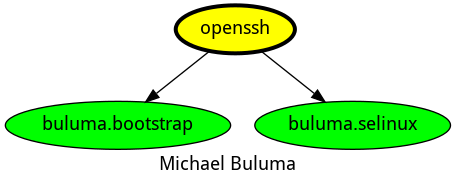
Here is an overview of related roles:
Compatibility
This role has been tested on these container images:
| container | tags |
|---|---|
| Alpine | all |
| Amazon | Candidate |
| EL | 8, 9 |
| Debian | all |
| Fedora | all |
| opensuse | all |
| Ubuntu | focal, jammy, bionic |
The minimum version of Ansible required is 2.12, tests have been done to:
- The previous version.
- The current version.
- The development version.
If you find issues, please register them in GitHub
Changelog
License
Author Information
ansible-galaxy install buluma.openssh